TOORCE Browser
Web applications and protected sites. In the managed policy the mode is locked to the TOORCE browser, other browsers are blocked, and the TOORCE extension is forced on.
Security topology · 01
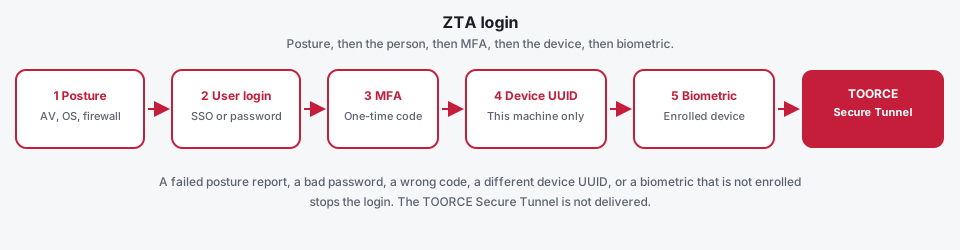
TOORCE SWG Agent is one Windows program for posture, login, the secure tunnel, and published applications. A user reaches a remote asset only through that agent. Sign-in is five checks, in order. The TOORCE Secure Tunnel is issued only after the last required check succeeds.
ZTA login
Each step has to succeed before the next one starts. A failure stops the session. There is no tunnel, and no published application, until this login is finished.
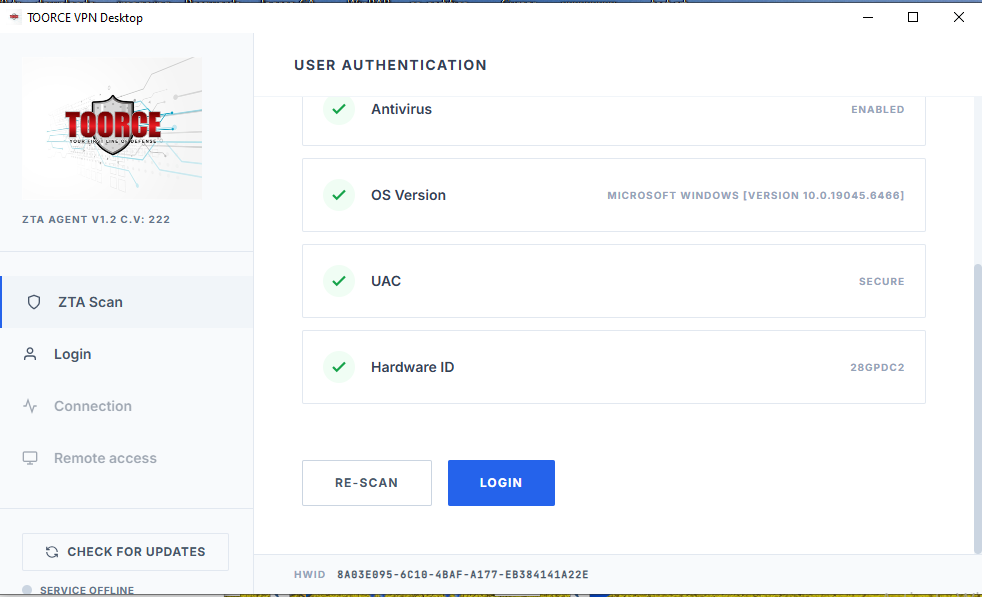
The agent scans the PC first: host firewall, antivirus, operating-system version, and privilege. A desktop with a ZTA profile cannot continue until that report matches the policy.
SSO against Windows or the domain, or a username and password through local accounts, LDAP, RADIUS, or TACACS+.
When MFA is on, the one-time password is checked next. Mobile OTP and email OTP are the two methods. A wrong code is refused.
The machine UUID must match the UUID stored on that account. The same password on another PC fails. An account marked for any device is the only exception.
When the profile requires biometric sign-in, the user confirms on that same device. The gateway sends a challenge, and the enrolled key for this user and this UUID signs it. A device that was never enrolled is refused.
Controlled clients
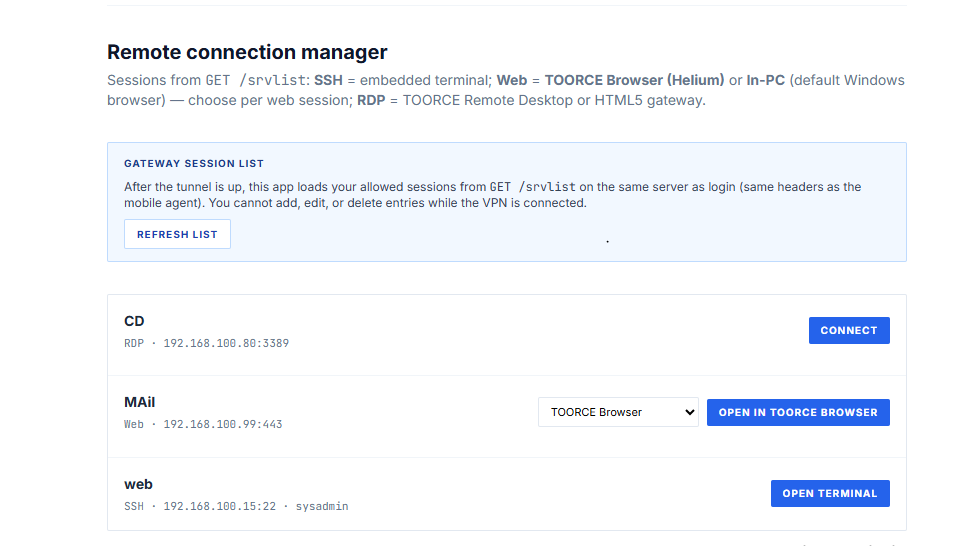
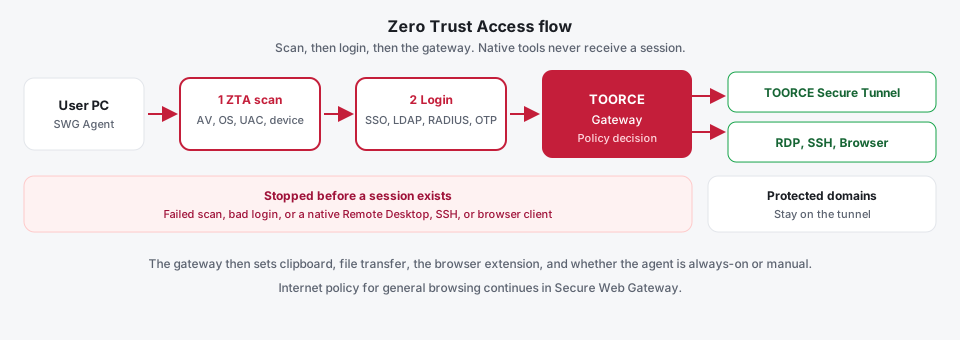
The published asset is opened by the TOORCE Browser, the TOORCE RDP client, or the TOORCE SSH client. Windows Remote Desktop, the system SSH command, and a normal browser such as Chrome or Edge are refused. They are not on the gateway’s client list, so they never receive the connection.
Web applications and protected sites. In the managed policy the mode is locked to the TOORCE browser, other browsers are blocked, and the TOORCE extension is forced on.
Published Windows desktops and servers. Clipboard and file transfer exist only when the gateway turned them on for that connection.
Published shells. The proxy answers only the TOORCE client. A native SSH program is rejected before it can see the host.
FortiClient, GlobalProtect, and a Sophos or Zscaler client are often a second or third program next to a VPN, a web filter, and a remote-desktop portal. TOORCE SWG Agent (product v1.2) keeps those jobs in one sidebar. The user learns one window. The gateway pushes one policy after login.
Internal names and addresses the gateway marks as protected are routed over the secure tunnel. The user does not add a PAC file or a manual route. Private applications stay on the encrypted path even when the rest of the internet is split out.
Setup chooses how the agent behaves after install. Manual means the user opens TOORCE SWG and signs in when they need access. Always-on starts with Windows, can sign in again from Remember me, and leaves the agent in the notification area when the window is closed. In Always-on, the login fields stay view-only until someone enters the gateway tamper password. Uninstall and the Program Files folder can require that same password or the uninstall PIN set at Setup.
Changed modules download from the TOORCE update service. A full reinstall is the fallback, not the usual path. The PC needs Windows 10 or 11, administrator rights for the first install, the Microsoft Edge WebView2 runtime, and a path to the gateway.
These clients do not keep their own policy. After sign-in they pull it from the appliance, so an administrator changes behavior for every user without touching the laptop.
Each person receives only their own RDP, SSH, web, and remote-support connections on that pool. A connection they were not given does not appear.
On every published RDP or SSH connection the gateway sets file transfer and clipboard separately. A contractor can view a desktop with both switches off.
The strict policy locks internet access to the TOORCE browser, forces the extension, and blocks every other browser. A relaxed profile is an explicit admin choice, not the default.
The browser policy sets upload and download size, blocked extensions and filenames, DLP checks, a required download scan, and form fields or patterns that must be blocked.
A tamper password on the profile means the user cannot turn the control off. Disabling it requires the password the administrator set on the gateway.
The same profile decides screenshots, screen watermarking, a required secure tunnel, and biometric sign-in, and the client applies those flags.
That is the business result: one place to allow a person onto a server, and one place to decide whether files, clipboard text, or a personal browser can leave with them. The security result is that the uncontrolled path — mstsc, OpenSSH, Chrome, Edge — is closed, because those programs cannot present themselves as a TOORCE client and cannot read the policy.
Most remote-access projects still start with a VPN. The user signs in, receives an address from a pool, and can reach whatever that subnet allows. A stolen password, a laptop with antivirus turned off, or a contractor who only needed one server all look the same once the tunnel is up.
FortiGate SSL-VPN and Palo Alto GlobalProtect are built around that model, then add posture (FortiClient tags, GlobalProtect HIP) and, on the larger licenses, a separate ZTNA or Prisma Access tier. The control often arrives as a second product, a second agent, and a second subscription. The network is still the thing being granted.
TOORCE keeps the decision on the appliance you already operate. Identity, one-time password, device health, web policy, and the list of published applications sit on one user profile. A user with no profile still gets a normal VPN. A user with a profile does not get a tunnel until the device matches the policy.
Fortinet (FortiGate and FortiClient), Palo Alto (GlobalProtect and Prisma Access), Sophos, and similar suites are strong products. A typical deployment still asks the user to run a VPN client, a posture agent, a web-filter agent, and a remote-access portal. TOORCE puts ZTA scan, tunnel, remote apps, and web policy in one Windows UI, driven by the gateway.
| What the business needs | Typical multi-product stack | TOORCE SWG Agent |
|---|---|---|
| Stop a bad device before it is inside | Login succeeds first. Posture is often a follow-up check, a tag, or a HIP report after the agent is already talking to the gateway. | Desktop clients must send a health report first. If a required check is missing, failed, or does not match, the TOORCE Secure Tunnel is never delivered. |
| Give a person an application, not a subnet | ZTNA access proxies and Prisma Access connectors do this, usually as an extra cloud or fabric license on top of the firewall. | The ZTA Proxy publishes the asset only to the TOORCE RDP, SSH, or browser client. Native Remote Desktop, system SSH, and other browsers are refused. Clipboard, file transfer, and the browser extension are switches on the gateway. |
| One policy the operator can explain | VPN portal, endpoint profile, web filter, and ZTNA server are often separate objects in separate menus. | One ZTA/SWG profile carries device policy, protected domains, location policy, secure-tunnel requirement, watermark, biometric sign-in, and the web-filter profile. |
| Keep traditional VPN for the people who still need it | Moving to ZTNA often means a parallel access method and a migration project. | No profile assigned means VPN only: username, password, and OTP when MFA is on. Posture and application publishing stay off until you attach a profile. |
| Prove why someone was refused | Denied sessions are spread across VPN, endpoint, and ZTNA logs. | Every authentication is audited with a reason: bad credentials, bad OTP, missing health report, or the exact check that failed. |
This compares a typical multi-product pattern with TOORCE’s single agent. It is not a claim that TOORCE leads on every metric. Fortinet, Palo Alto Networks, GlobalProtect, Prisma, Sophos, and the other names above are trademarks of their owners. Those platforms remain a strong fit when the buyer wants a large cloud point-of-presence network or a very large application library.
Required checks run before the tunnel file is delivered. A failed antivirus, host firewall, privilege, OS version, or hardware identity blocks the session.
The account is bound to a device UUID. The same password from another machine fails that check. When biometric sign-in is on, the user must also confirm on the enrolled device.
The proxy returns only the connections assigned to that user on that pool. There is no route to the rest of the site.
The same profile that allowed the login also selects the Secure Web Gateway policy, so web control does not depend on which IP the VPN happened to assign.
The profile can require a secure tunnel, turn on screen watermarking, and control screenshots, so a published desktop is harder to walk out of the building on a phone camera.
Staff who only need network access stay on credentials and OTP. You turn on zero trust per person, not as a flag day for the whole company.
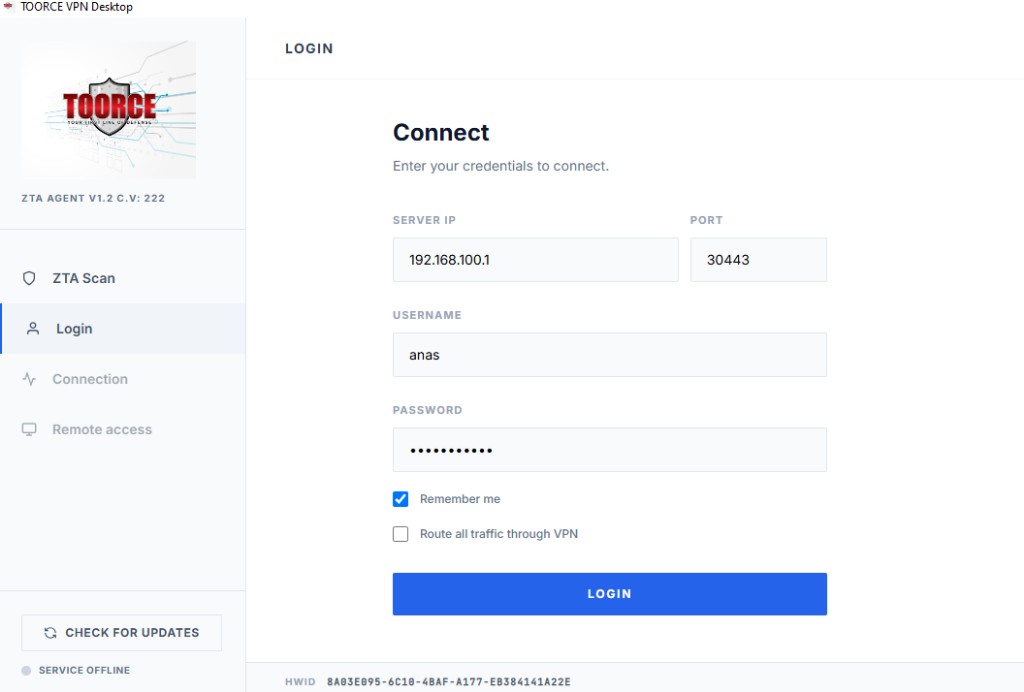
The agent runs the posture check first, then calls /auth. The service accepts the user login only when the password and the device UUID match the account. MFA is the one-time password after that, mobile or email. When the profile requires biometric sign-in, the device signs a gateway challenge with the key enrolled for that username and that UUID. A desktop profile still has to present a matching posture report before the TOORCE Secure Tunnel is sent.
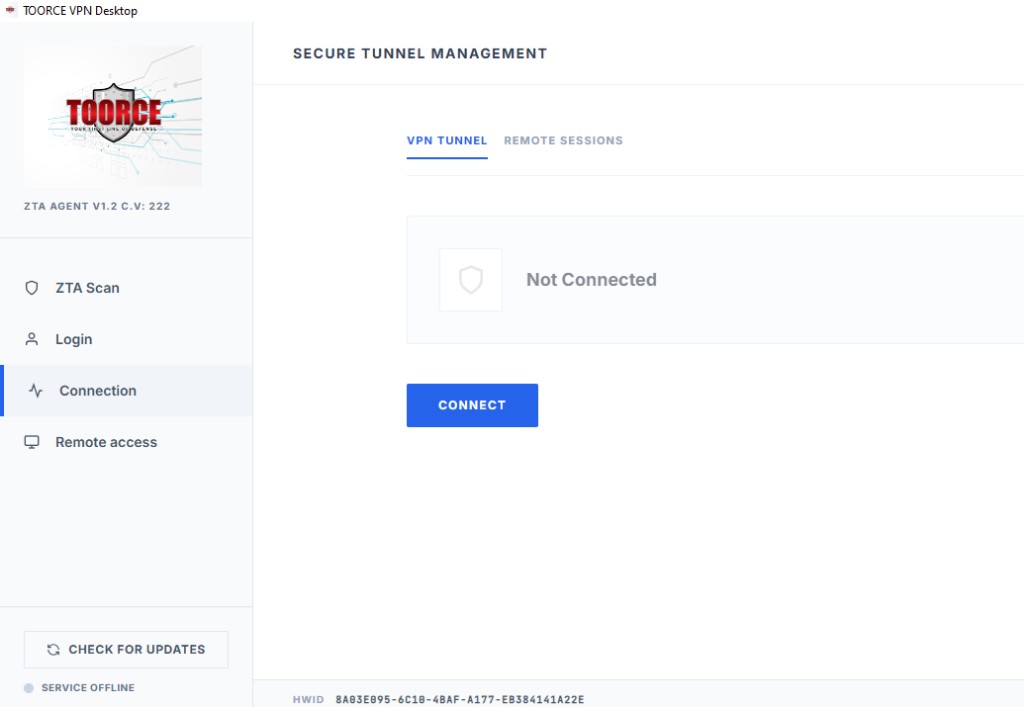
Mobile clients skip the desktop health comparison. Location policy, protected domains, biometric sign-in, and the web-filter profile are all fields on the same ZTA/SWG profile, so the operator changes one object when a role changes. A refusal is recorded with a reason, and a live session can be disconnected from the gateway.
Step-by-step screens for pools, users, and SSL/ZTA access are in the Firewall administrator guide.