Agent
The TOORCE client pulls the web policy after sign-in. Remote staff keep the same categories, file rules, and browser lock when they are off the network.
Security topology · 02
One web policy, enforced with an agent or without one, on the local appliance or as a hybrid of the branch and the remote user. It can run all the time or only inside a time window, and it inspects the content people send — including prompts to AI services — through the TOORCE Browser.
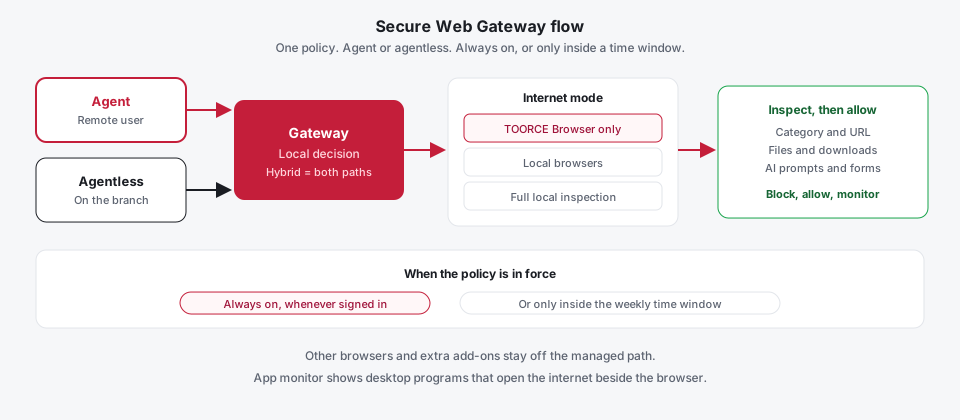
How it is deployed
The same profile does not require every user to install software, and it does not require every user to sit on the LAN.
The TOORCE client pulls the web policy after sign-in. Remote staff keep the same categories, file rules, and browser lock when they are off the network.
On the branch, matching web traffic is steered into the filter on the appliance. The PC does not install an agent and does not point a browser at a proxy address.
Inspection and the category decision run on the appliance. Hybrid is both paths under one profile: agentless for people on site, the agent for people outside, including when the site they open is a cloud application.
After login the agent syncs the internet policy. The gateway picks the mode:
The same screen shows Allow-run. Always-on keeps the agent enforcing after reboot. Manual waits until the user signs in. A time profile limits the policy to a weekly window. Those three are chosen on the gateway, not in the browser’s settings. The agent itself — scan, login, and tunnel — is described on Zero Trust Access.
When Allow-run uses a schedule, Custom attaches a time profile: hours in the week, an action for each range, and a default for every hour that is not listed. A category can be open from 09:00 to 17:00 and closed the rest of the week without a second rule. Allow-run set to On applies the policy whenever the agent is signed in. The bar in the flow above is that choice.
Category blocking stops a site. Content inspection looks at what the user sends and receives. The profile sets inspection to full, basic, or none. Full inspection is the managed path: uploads and downloads have a size limit, blocked extensions and filenames, a required malware scan on download, and data-loss checks for patterns such as personal data and payment cards.
That same inspection covers text a user submits, including a prompt typed into an AI service. Names, card numbers, and other marked data are checked before they leave in that request. Form fields and patterns the administrator listed are blocked or monitored. The control sits on the connection to the service, so moving the conversation to another AI site does not drop the check.
Size, file type, filename, and a required scan are gateway settings. A user cannot raise the limit from the laptop.
PII and PCI checks, plus blocked field names and patterns, apply to content the user posts. A prompt is inspected the same way as a form.
If rating is unavailable, the profile fail mode decides. The outage has a chosen result instead of an open browser.
Browsers are not the only programs that leave the PC. App monitor lists other desktop applications that opened an internet connection, so a background tool is visible next to the web policy. The list is refreshed from the agent. It does not replace the category decision. It shows which program to investigate when traffic does not match the browser the user claims to be using.
Internet access for a managed user goes through the TOORCE Browser. The policy locks that mode, forces the TOORCE extension, and blocks other browsers. Staff do not install plugins or add-ons to get around categories, file rules, or prompt inspection. A personal browser with an unknown extension is not the path the gateway allows. A relaxed profile that permits local browsers is an explicit administrator choice, not the default. Inspection depth, file size, and antivirus scanning are part of that same policy, shown as the inspect step in the flow.
A firewall web filter attached only to a subnet goes blind the moment the user is remote, on a phone, or sharing an address pool with someone who has a different job. TOORCE resolves the web policy from the signed-in user. Category rating, URL rules, the time window, and the fail mode travel with that account.
FortiGate web filter and Palo Alto URL Filtering are usually evaluated after the session is already on a firewall policy, and prompt control for AI is often a separate subscription. TOORCE asks a rating service for this user — block, allow, or monitor — and inspects the body on the same profile. Custom URL rules are checked first. If the rating service has no answer, the user’s category action is used, and if that is missing the gateway falls back to the category default or the profile fail mode.
The access service exposes the user’s policy, including whether enforcement is always on or tied to a time profile, then rates each requested URL. A category service on the appliance returns a category and an action. URL rules on the policy can override that result. Uploads, downloads, and submitted text are checked against the file policy and the form policy. The decision is cached for the policy’s TTL so every page view does not wait on a fresh lookup.